HOKIO / INTEGRATION GUIDES
Receive AI callbacks in a local n8n workflow with Hokio
Build a local n8n workflow for asynchronous AI job callbacks, with a JSON event example and duplicate-event guidance.
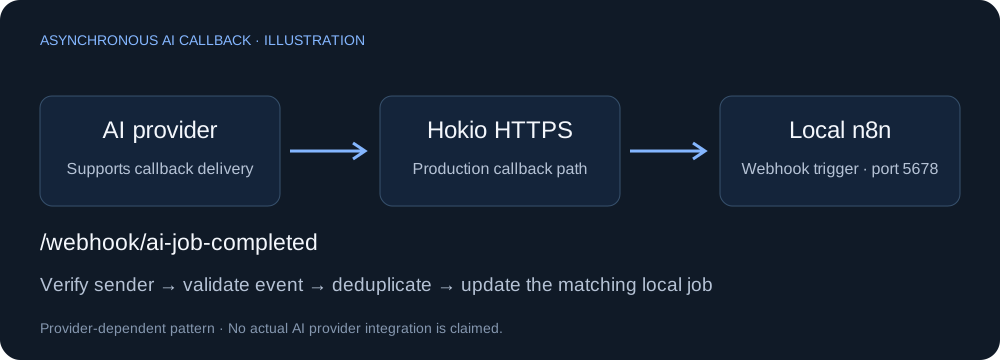
The callback pattern
An AI service can take longer than an ordinary HTTP request. When your provider supports asynchronous jobs with callback URLs, let it notify a local n8n workflow after the work finishes:
Your app → AI provider: submit job + callback URL
AI provider → Hokio HTTPS URL → local n8n Webhook
n8n → validate event → find job → update local state
This is a provider-dependent pattern, not a built-in capability of every AI API. A webhook URL does not give an AI tool unrestricted access to your machine.
1. Prepare your local workflow
Complete the n8n local webhook guide. Set the Webhook trigger to POST, with Path ai-job-completed. Restrict Hokio to the exact test and production paths for this workflow. Start with an immediate response and a harmless event inspection before adding side effects.
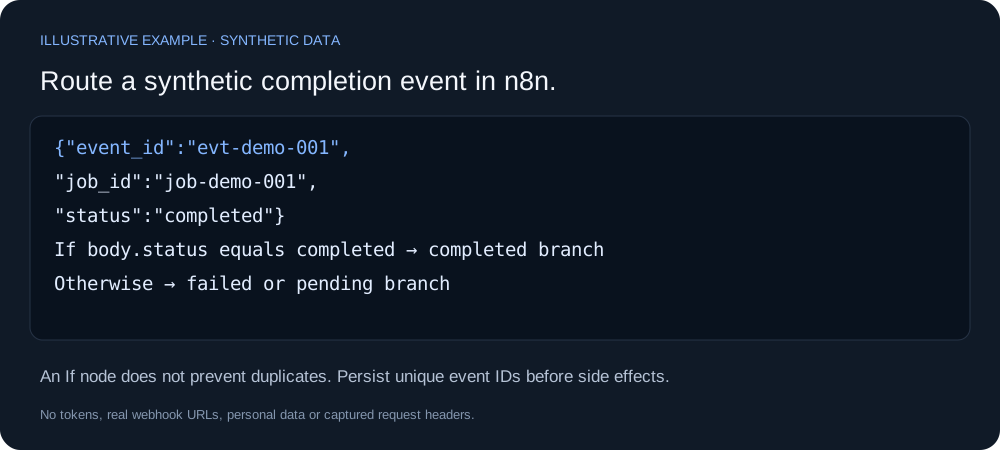
Add an If node after the Webhook trigger. Check {{ $json.body.status }} equals completed. Route unmatched events to a separate branch for failed or pending jobs. Also require a nonempty event_id and job_id before business actions.
2. Test a synthetic AI result
Save this as event.json. Field names are illustrative; map your provider's actual schema.
{
  "event_id": "evt-demo-001",
  "job_id": "job-demo-001",
  "event": "job.completed",
  "status": "completed",
  "result": {"summary": "Demo result; no customer data"}
}
Enable the test listener and send:
curl -i -X POST https://YOUR_ASSIGNED_HOKIO_HOST/webhook-test/ai-job-completed -H "Content-Type: application/json" --data-binary @event.jsonWindows PowerShell: use curl.exe. Confirm that the If node selects the completed branch. Repeat with "status":"failed" and verify the alternate branch. This test does not call an AI provider or incur API charges.
3. Connect your actual provider
Authenticate the Webhook node, implement the provider's signature verification if available, publish the workflow, and give the provider the production callback URL:
https://YOUR_ASSIGNED_HOKIO_HOST/webhook/ai-job-completedThe sender must support the authentication you configure. Verify signature bytes before changing or parsing signed payloads. Store the provider job ID when you submit the job, so the callback can be matched to the correct local record.
Before updating records or notifying people, persist each verified event ID in a database with a unique constraint. Claim an event atomically and skip duplicates; a simple If node alone does not prevent races. Use the provider's retry policy and reconcile job status after outages. Hokio does not queue events while your device is offline.
Keep processing short or hand work off after a durable receipt. A successful HTTP response is not proof that a later local action succeeded.
What to build next
- Document summarisation: receive completion and update a local job record.
- Image generation: receive the result reference, then validate its origin before downloading.
- Human review: prepare a draft from the callback and require approval before publishing.
Reference: n8n Webhook node configuration. Provider authentication and retries must follow that provider's documentation.